

Accountancy & Tax
Document Manager
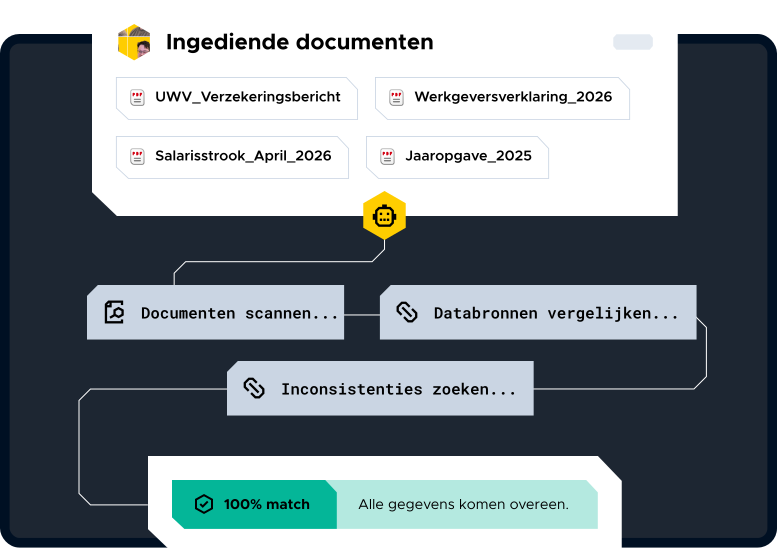
Checking customer documents takes time that you’d rather spend on something else. Document Manager automatically compares submitted documents against multiple data sources and immediately confirms their accuracy and completeness. No manual searching, no double-checking.

Discover Document Manager
Stop checking manually

Compare documents one by one with the source data
Determine for yourself whether a submission is accurate and complete
Wasting time on checks that the system can perform
Spending valuable time on administrative prep work
What Document Manager Does for You

Automatically compares submitted documents against multiple data sources

Checks customer records for completeness and accuracy

Provides an immediate answer: correct or incorrect

Replaces manual checks with an automated process

Less manual work Faster and more accurate results Fewer errors in audit processes More time for higher-value tasks Immediate insight Document Manager The AI Document Manager automatically recognizes, classifies, and verifies submitted documents. It flags inconsistencies, protects personal data, and maintains audit trails. Software that not only scans documents (like traditional OCR), but also identifies what the document is, classifies its content, and verifies that the information is accurate. The difference: OCR reads text; intelligent document processing understands the document. For an office, this means: annual reports, identification documents, and customer records that verify their own accuracy. Yes, by comparing submitted documents against multiple data sources instead of just one. This gives you an immediate confirmation of whether the information is accurate and complete—a more consistent approach than a manual check done under time pressure. See how Blinqx Accountancy & Tax puts this into practice. Choose to process data within your own system, with personal data protection and a complete audit trail. Documents containing social security numbers and financial data do not belong in standalone AI tools outside your environment. No. AI eliminates the administrative legwork: identifying, classifying, and comparing. The substantive assessment of the case remains the responsibility of the case worker. The more precise the software’s subject matter expertise is, the less the case worker needs to correct. High-volume processes with fixed checks: customer documents during onboarding, annual reports, and identification documents. Document verification also strengthens the KYC process. Completely automates tax authorizations and deferral requests. Requests authorizations from the Tax Office, collects pre-completed returns as soon as they are available and monitors extensions where possible. In this way, the basic conditions for filing returns are always in order and the advisor can focus on substantive work. Automates actuarial calculations for pension provisions in financial statements. Automatically applies current mortality tables, indexations and interest rates and processes changes directly per file. This saves annual calculations, reduces dependence on specific knowledge and increases accuracy and continuity within the office. Automatically performs client due diligence on new and existing clients. Checks UBO structures, identities and risk profiles against current regulations. This ensures faster underwriting, fewer manual checks and a demonstrably compliant client base. Ask substantive questions on complete client files and get instant, substantiated answers based on all available documents. The agent searches legal and tax structures and extracts relevant information including context. This significantly reduces search time and provides assurance that insights are complete and correct. Automatically verifies submitted documents by comparing multiple data sources. Identifies inconsistencies and immediately determines whether information is correct and complete. This replaces manual checks and increases the speed and reliability of the process. Supervises the migration of financial data between systems without loss of structure or history. Checks data quality, recognizes inconsistencies and transfers data correctly to the new environment. This minimizes risks during system changes and shortens implementation processes. Software that not only scans documents (like traditional OCR), but also identifies what the document is, classifies its content, and verifies that the information is accurate. The difference: OCR reads text; intelligent document processing understands the document. For an office, this means: annual reports, identification documents, and customer records that verify their own accuracy. Yes, by comparing submitted documents against multiple data sources instead of just one. This gives you an immediate confirmation of whether the information is accurate and complete—which is more consistent than a manual check done under time pressure. See how Blinqx Accountancy puts this into practice Choose to process data within your own system, with personal data protection and a complete audit trail. Documents containing social security numbers and financial data do not belong in standalone AI tools outside your environment. No. AI eliminates the administrative legwork: identifying, classifying, and comparing. The substantive assessment of the case remains the responsibility of the case worker. The more precise the software’s subject matter expertise is, the less the case worker needs to correct. High-volume processes with fixed checks: customer documents during onboarding, annual reports, and identification documents. Document verification also strengthens customer due diligence— see the KYC Agent. Improving and developing our solutions with AI is deeply ingrained in our way of thinking and working. By integrating industry-specific solutions onto our Qore/AI platform, we have access to a rich database that enables us to deliver AI innovations that add value across multiple industries simultaneously.
Document Manager Results


No archiving work. No verification work. Immediately audit-ready.
Frequently Asked Questions
Hide first
What is intelligent document processing, and how can it benefit an accounting firm?
Can AI reliably review client documents in the accounting field?
As a law firm, how do you handle personal data in AI-based document processing?
Will AI replace the case worker?
Which document processes within accounting firms are the most suitable for AI?
Even More AI for Accounting & Tax
Deferral Fiscal Authorization
AI Agent
Pension Robot
AI Agent
KYC Agent
AI Agent
Client Structure Charter
AI Agent
Document Manager
AI Power-up
Data Migration Agent
AI Power-up
Frequently Asked Questions
Hide first
What is intelligent document processing, and how can it benefit an accounting firm?
Can AI reliably review client documents in the accounting field?
How does your firm handle personal data in document processing?
Will AI replace the case worker?
Which document processes within accounting firms are the most suitable for AI?
Better Every Workday